~
/my-new-audiobook-setup
<- back
My new audiobook setup
The idea
I've been using Audible for some time now. In the beginning, I was kind of against audiobooks. The audio format is so fluid and it's more passive than actual reading - it's easy to lose the thread while listening to content. But I came to the conclusion that the audio format is much better than no format. If you find something intriguing you can always come back to it in written form later. And it's pretty awesome to be able to learn stuff or just consume content while at the gym, on a run or doing the laundry.
Audible has an ok iPhone app that enables rewinding and bookmarking. But the experience of going through those bookmarks later on is not great. And it's pretty difficult to get back to the content that you listen to in written form later on. First you need to have both the Audible book and the physical book. Then you need to find the right section of the book from your bookmarks. Enough friction for it to not be something I do commonly. So I set out to look for something else.
I imagined an app where I could upload a PDF file or a website blog post, get it turned into audio, listen to the audio on my phone, add some bookmarks and come back to the PDF/website text and see exactly what I've listened to and where my bookmarks landed. I could then add some comments directly in the text, next to my bookmarks, and that would close the loop. I looked pretty hard, but none of the apps I could find was really ideal for my use case. Either it didn't have a mobile app, or the app didn't allow for easy bookmarking, or the text-to-speech voice was unbearable... So I gave up on the idea. Nowadays, we have coding agents so I thought why not join the DIY-software mania and build something myself. This blog post is about my new setup that I landed on.
The server
For the audiobook server, I found audiobookshelf, a pretty cool project that lets you self-host your own audiobook server, which serves as the back-end, including an API. Right now, it's set up on Hetzner with a CAX11 instance (2 vCPU ARM, 4 GB RAM, 40 GB SSD) for less than €5/month.
The phone app
For the phone app, Audiobookshelf also comes with a companion phone app, but it's in beta and they don't seem to accept new users. There are some third-party phone apps that build on the audiobookshelf API (though beware of the security risks). I don't have too many secrets in my audiobooks, so I ended up going for this option. The app that I'm using right now is called Still. It has a pretty minimalistic interface, and allows for bookmarking in an easy way on the go.
The text-to-speech
The last part was figuring out the text-to-speech part. Initially, I tried out ElevenLabs, but found the high-quality models to be surprisingly expensive. After testing a couple of different providers, I found that the OpenAI tts-1 model strikes a pretty good balance between price and quality. As a comparison, consider an 8-hour book (that's roughly 450k characters of source text), the price difference between OpenAI and ElevenLabs is almost an order of magnitude ($54.00 vs $6.75), and it's just at the cutoff point where I would think twice about rendering a book because of the price.
| Provider | Model | Rate | 8h book |
|---|---|---|---|
| OpenAI | tts-1 | $15/1M chars | $6.75 |
| ElevenLabs | multilingual-v2/v3 | $120/1M chars | $54.00 |
Quality-wise? I find the quality for these two options to be pretty good and comparable (judge for yourself: ElevenLabs multilingual-v2/v3 and OpenAI tts-1), while lower tier (and cheaper) ElevenLabs models didn't give that impression.
Bookmarking and follow-up
When a text is turned into audio with the OpenAI API, I can also upload it into a Google Doc. A small sidecar file keeps the exact text that each track was rendered from. While listening, I bookmark in the phone app and back at the computer I can pull the bookmarks from the audiobookshelf API back into the Google doc. A bookmark is just a timestamp into the book, so it first gets mapped to a track and a time inside that track. The track is transcribed with OpenAI's Whisper to get word-level timings (cached, so each track is only paid for once). The transcript is then aligned against the original text to find the exact word I was hearing when I pressed the button. That word gets highlighted in the Google Doc with a label [B1], [B2], ...
This roundtrip might feel a bit stupid. The OpenAI tts-1 API gives you an MP3 and nothing else. It doesn't tell you when each word is spoken (which ElevenLabs API does), so the only way to get that timing afterwards is to listen to the audio again, which I do with Whisper. Whisper is cheap and you only need to process the few tracks that have bookmarks attached. If you bookmark every single track in an 8-hour book (very unlikely), that would cost $3.
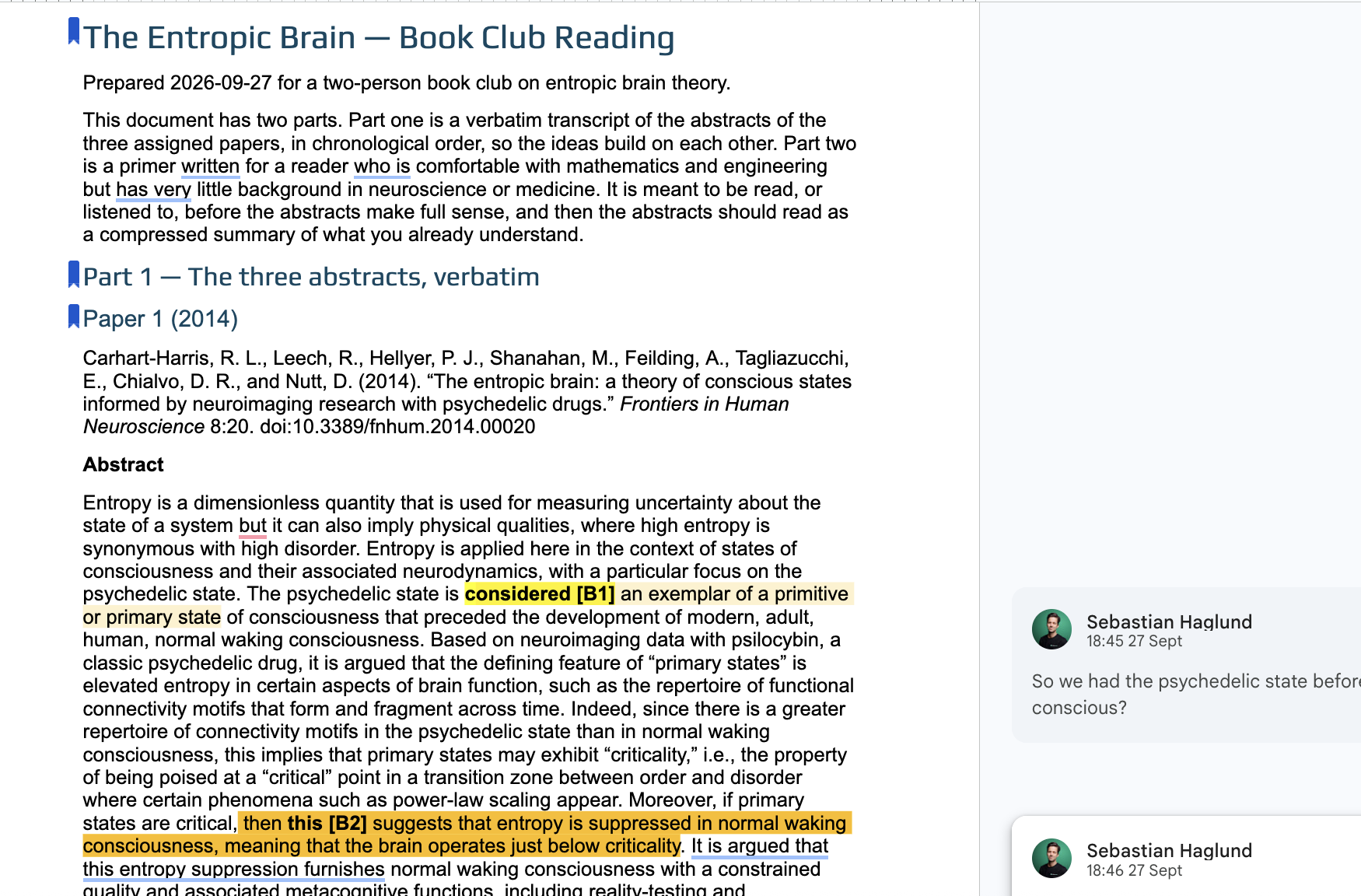 The Google Doc for some book club reading on the entropic brain, with bookmarks synced in and some follow-up comments.
What's next?
I think I ended up reasonably close to my original vision with this setup. I've already used it several times and it does feel like a pretty optimal setup for learning about a new topic (like entropic brain theory above). Hard to see today how this setup could be improved from a learning experience perspective, short of a brain implant. But I'm sure it can, we'll see.
Credits: Shamelessly written and refined with LLMs.